The New Developer Blindspot: Unchecked AI IDE Context Injection#
The software engineering workflow has experienced a profound shift. Tools like Cursor, Windsurf, GitHub Copilot, and Claude Desktop have transitioned from simple tab-autocompletion helpers into autonomous agentic coding environments.
To provide high-quality completions and execute multi-file refactors, modern AI IDEs perform automated context aggregation:
- They index your entire workspace repository.
- They automatically parse local configuration files and environment definitions (.env, .env.local, config.json).
- They inject git diffs, terminal outputs, database migration schemas, and active stack traces directly into prompt context windows dispatched to external cloud LLM providers.
In their quest for developer velocity, engineering teams routinely create severe, unmonitored security leaks.
A developer debugging an authentication error in Cursor or Claude Desktop might effortlessly pass a live production payload containing: 1. Supabase Service Role Keys & JWT Tokens: Exposing complete administrative bypass over production PostgreSQL tables. 2. Production Database Connection Strings: Including cleartext hostnames, usernames, and passwords. 3. Live Customer Data Dump: Real customer emails, phone numbers, and Israeli ID numbers captured in error log snippets. 4. Proprietary Algorithmic IP: Internal business logic transmitted to third-party commercial servers.
> Unless explicitly excluded via rigid ignore patterns, AI IDE background indexers regularly parse local configuration files. A single inadvertent prompt question like *"Why is this database query failing?"* can attach your private production credentials to the model payload.
The Risk Surface in Model Context Protocol (MCP) Workflows#
The rapid industry adoption of Anthropic's Model Context Protocol (MCP) has magnified this vulnerability exponentially.
MCP establishes a universal, open standard for connecting LLMs to external tools, data sources, and enterprise environments. Through MCP servers, AI agents in Cursor or Claude Desktop can: - Query production PostgreSQL and SQLite databases directly. - Inspect GitHub pull requests, private issues, and commit histories. - Read internal Slack messages, Google Docs, and Jira tickets.
┌────────────────────────────────────────────────────────────────────────┐
│               THE MCP UNFILTERED DATA EXPOSURE LOOP                    │
├──────────────────┬──────────────────┬─────────────────┬────────────────┤
│ AI IDE Agent:    │ Local MCP Tool:  │ Return Payload: │ Cloud LLM:     │
│ Asks: 'Find Dan's│ Queries Postgres │ Returns raw row │ Ingests phone, │
│ active invoices' │ database table   │ with cleartext  │ email, ID      │
│                  │                  │ PII & secrets   │ into cloud API!│
└──────────────────┴──────────────────┴─────────────────┴────────────────┘
When an agent executes an MCP tool call against a database, the tool output is injected directly back into the LLM context stream without passing through any data sanitization layer. If the database returns 50 customer rows containing emails and phone numbers, all 50 records are immediately dispatched across the external network to the model provider.
Architecture of an Air-Gapped MCP Gateway#
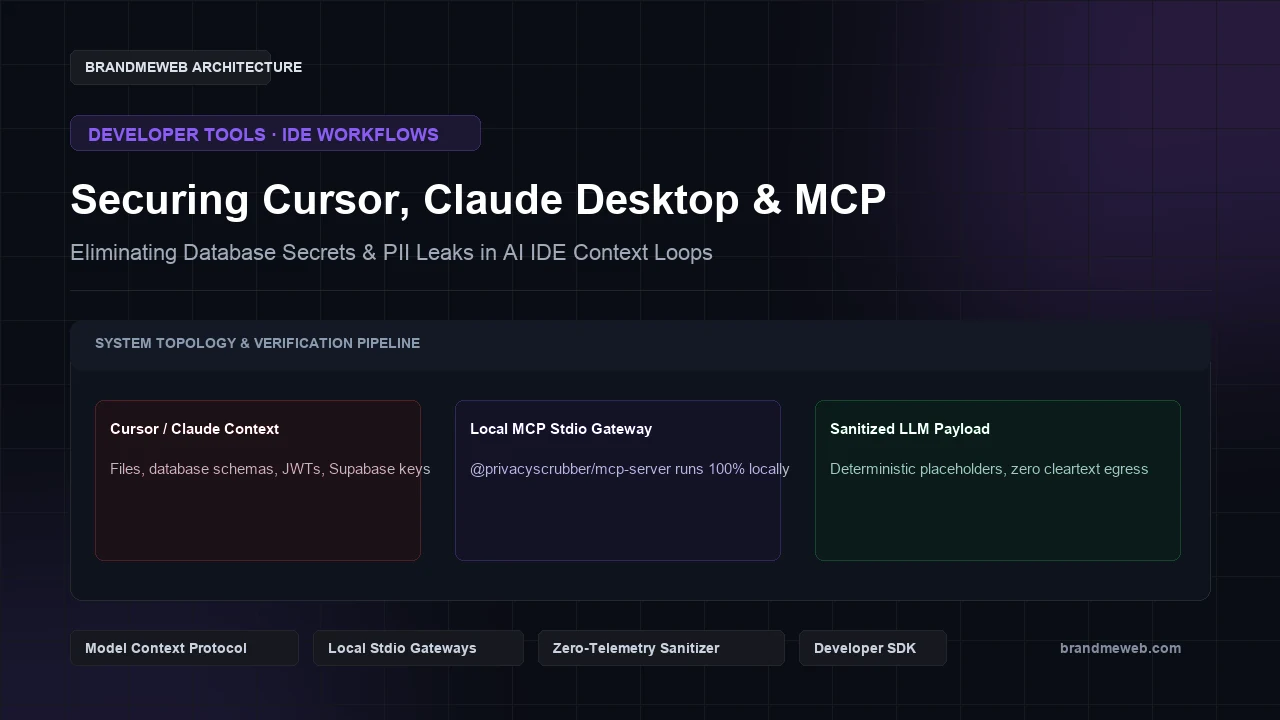
To protect developer workflows without compromising AI coding speed, BrandMeWeb applies the Zero-Trust Data Sanitization (ZTDS) protocol to IDE context loops via an air-gapped local MCP stdio architecture.
Instead of allowing IDE tools to communicate directly with external clouds in cleartext, all agent inputs and tool outputs pass through a local, in-memory sanitization gateway:
IDE Agent (Cursor / Claude Desktop)
          │
          ▼
Local Stdio Sanitization Gateway (@privacyscrubber/mcp-server)
          │  100% in-memory RAM pattern detection (sub-5ms)
          │  Replaces API keys, tokens, and PII with deterministic tokens
          ▼
External Model Cloud (Anthropic / OpenAI)
Key operational features of the ZTDS MCP gateway:
1. Zero Network Egress: The gateway runs as a local stdio process on 127.0.0.1 with zero external network socket listeners and zero cloud telemetry.
2. Deterministic Tokenization: Database credentials, email addresses, and phone numbers are converted into semantic tokens ([SERVICE_KEY_1], [EMAIL_TOKEN_1]), allowing the AI agent to reason about code architecture without possessing the actual secret.
3. Local Re-hydration: When code diffs return to the developer editor, tokens are restored locally in memory.
4 Steps to Secure Your Engineering Team in Under 15 Minutes#
- 1Verify Your Prompt Risk Immediately:
- 2Run your standard developer prompts or error snippets through the free BrandMeWeb AI Data Leak Checker. Inspect how easily API credentials and user data leak into raw LLM requests.
- 1Configure Strict Workspace Ignore Rules:
- 2Create a
.cursorignorefile in your repository root:
.env*
*.pem
*.key
**/credentials*
**/logs/**
- 1Deploy the Local Stdio MCP Sanitizer:
- 2Configure your IDE or Claude Desktop configuration to pipe tool queries through an in-memory sanitizer package:
{
  "mcpServers": {
    "privacy-scrubber": {
      "command": "npx",
      "args": ["-y", "@privacyscrubber/mcp-server"]
    }
  }
}- 1Commission an Enterprise AI Compliance Audit:
- 2Secure formal verification and an official Zero-DPA compliance memorandum through the BrandMeWeb AI Compliance & Privacy Audit.